Rendering a soap bubble, one wavelength at a time
Building a transparent, iridescent WebGL shader from a sphere, an HDR environment and a little thin-film optics.
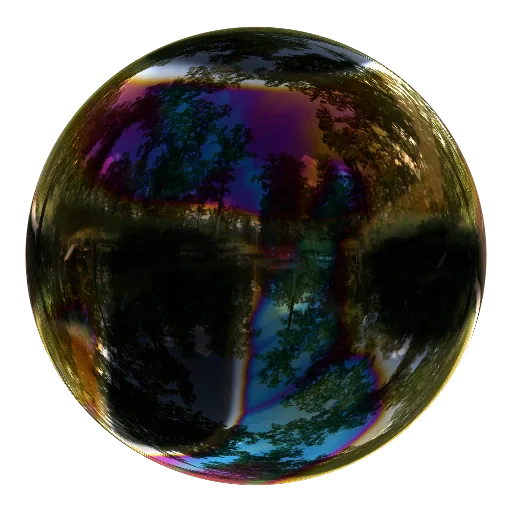
A soap bubble is almost nothing: a film of liquid, a few hundred nanometres thick, wrapped around air. Yet it can reflect a whole landscape and split white light into moving bands of pink, green and blue.
That combination makes it a surprisingly rich shader problem. A bubble is transparent, but it is not invisible. It has a front wall and a rear wall. Each wall contains two optical interfaces. Light can reflect from any of them, pass through the shell, or bounce between the walls before reaching the camera.
I built this shader by treating those layers separately. First comes the shape. Then the environment it reflects. Then Fresnel reflection, which makes the rim stronger than the centre. Finally, thin-film interference turns the neutral reflection into colour.
The result is physically motivated rather than spectrally exact. It is designed to run in real time in a browser, and I will point out the approximations as we reach them.
Start with a complete surface
An opaque sphere only needs its nearest intersection. The front hemisphere hides everything behind it. A transparent bubble is different: a viewing ray meets the shell at the front, travels through the air inside, and meets it again at the back.
So the first step is to find both points.
The shader draws a full-screen rectangle. For each pixel, it constructs a viewing ray. I use an orthographic camera, which means every ray travels in parallel along the negative z axis. A unit sphere centred at the origin satisfies
Once the pixel gives us x and y, the two possible depths are
The positive root lies on the front hemisphere; the negative root lies on the back.
vec2 p = uv / 0.9;
float radiusSquared = dot(p, p);

if (radiusSquared >= 1.0) {
    gl_FragColor = vec4(0.0);
    return;
}

float depth = sqrt(1.0 - radiusSquared);
vec3 frontPoint = vec3(p,  depth);
vec3 backPoint  = vec3(p, -depth);
dot(p, p) is x² + y². If it is greater than one, the ray misses the sphere. Otherwise the square root gives both intersections directly.
This is ray–surface intersection, not raymarching. Because the surface has a simple mathematical description, there is no reason to advance through space in small steps. The live shader uses the same idea for a very slightly oval ellipsoid.
We also need a normal at each point. For a sphere at the origin, the outward normal is simply the normalised position:
vec3 frontNormal = normalize(frontPoint);
vec3 backNormal  = normalize(backPoint);
The normal tells us how the surface is oriented. It will determine both which part of the environment is reflected and how much of that light survives the encounter.
Give the bubble a world to reflect
A reflection is only interesting if there is something around the object. A hand-built light shaped like a disc or rectangle produces a suspiciously perfect highlight: uniform inside, sharp at the boundary, almost like a box filter stamped onto the surface.
For the finished bubble I use an HDR environment map instead. It is an equirectangular panorama containing the radiance arriving from every direction around the object. The live shader uses Meadow by Sergej Majboroda, a CC0 HDRI from Poly Haven. Open sky, dark foliage and gaps between the trees all become structure in the reflection.
For a perfectly smooth surface, GLSL gives us the reflected direction:
vec3 incident = vec3(0.0, 0.0, -1.0);
vec3 reflectedDirection = reflect(incident, frontNormal);
We are tracing backwards from the camera. incident follows the viewing ray towards the bubble; reflect tells us which direction in the environment could have supplied the light that returns along that path.
The direction becomes a coordinate in the panorama through longitude and latitude:
vec2 environmentUV(vec3 direction) {
    float longitude = atan(direction.z, direction.x);
    float latitude  = asin(clamp(direction.y, -1.0, 1.0));

    return vec2(
        fract(longitude / 6.2831853 + 0.62),
        latitude / 3.14159265 + 0.5
    );
}
The horizontal offset rotates the panorama into the composition I wanted. The environment is treated as infinitely far away, so it changes with direction but has no parallax when the bubble moves.
The “high dynamic range” part matters. A display-ready photograph may compress a white cloud and the sun towards the same maximum value. An HDRI preserves the difference. If the material reflects only four per cent of the incoming light, the distinction is still enormous:
The exact numbers are illustrative, but the lesson is practical: do not clamp the environment before shading. Keep radiance in linear light, combine reflection and transmission, and only then map the result to the display.
In this project the HDR values are packed as RGBE data inside lossless WebP files. RGB stores the mantissa and alpha stores a shared exponent:
vec3 decodeEnvironment(vec2 st) {
    vec4 rgbe = texture2D(environment, st);
    return rgbe.rgb * 255.0
         * exp2(rgbe.a * 255.0 - 136.0);
}
That is a storage detail, not a requirement of the lighting model. A floating-point HDR texture works too. The important rule is to interpolate decoded linear radiance, rather than blending encoded exponents.
An HDRI does not blur the reflection by itself. A locally smooth film reflects sharp detail, even when the bubble’s overall shape bends and stretches. Roughness would spread one reflection direction over many nearby directions; this shader deliberately keeps the surface smooth.
Make the shell transparent
At a lossless surface, every colour channel is divided between reflection and transmission:
For one encounter, the outgoing radiance is therefore
vec3 transmission = vec3(1.0) - reflectance;

vec3 radiance = reflectance * reflectedLight
              + transmission * lightFromBehind;
This simple expression already produces a transparent front hemisphere. It is still only half a bubble.
Light visible through the complete shell crosses both walls. The rear wall also reflects part of the environment back towards the camera. If we keep only the first version of each path, the result is approximately
Here, E is environment light, B is the background, and f and b identify the front and rear walls. The rear reflection crosses the front wall on the way in and on the way out, which produces .
The ray can also make more round trips between the walls. Each round trip contributes another factor of , giving a geometric series. We can sum it without tracing an unbounded number of rays:
vec3 frontT = vec3(1.0) - frontR;
vec3 backT  = vec3(1.0) - backR;

vec3 denominator = max(
    vec3(0.00001),
    vec3(1.0) - frontR * backR
);

vec3 backWeight = frontT * frontT * backR / denominator;
vec3 throughWeight = frontT * backT / denominator;

vec3 radiance = frontR * frontEnvironment
              + backWeight * backEnvironment
              + throughWeight * backgroundLight;
Before the numerical guard becomes active, these weights conserve energy. The implementation does make a directional approximation: later bounces reuse the first rear-reflection direction instead of tracing every encounter around the curved shell. Transmission also continues straight through rather than modelling the tiny lateral displacement through the film.
The structure is now complete. What remains is to calculate R.
Fresnel makes the edge appear
Look straight down into calm water and you can see below the surface. Look across it at a shallow angle and the reflection becomes much stronger. A bubble follows the same rule.
The incident angle θᵢ is measured from the surface normal. At the centre of our sphere, the normal faces the camera and θᵢ is zero. Near the silhouette, the viewing ray grazes the surface and θᵢ approaches 90°.
We only need its cosine:
vec3 viewDirection = vec3(0.0, 0.0, 1.0);
float cosI = clamp(
    dot(frontNormal, viewDirection),
    0.0001,
    1.0
);
The dot product saves us from calculating the angle with acos. With this fixed camera it is simply frontNormal.z.
The shader treats the liquid as water, with refractive index n = 1.33, and approximates air as n = 1. Snell’s law gives the angle θₜ inside the liquid:
Working in cosines gives a shader-friendly form:
const float FILM_IOR = 1.33;

float cosT = sqrt(
    1.0 - (1.0 - cosI * cosI)
        / (FILM_IOR * FILM_IOR)
);
Fresnel reflection has two components: s, polarised perpendicular to the plane of incidence, and p, parallel to it. Their amplitude reflection coefficients at our air–water boundary are
Squaring them converts amplitude to reflected power. For unpolarised light we average the two:
float rs = (cosI - FILM_IOR * cosT)
         / (cosI + FILM_IOR * cosT);
float rp = (FILM_IOR * cosI - cosT)
         / (FILM_IOR * cosI + cosT);

vec2 F = vec2(rs * rs, rp * rp);
float interfaceR = 0.5 * (F.x + F.y);
F.x and F.y are the two polarisations, not red and green colour channels. The shader keeps them separate because interference affects each one through its own Fresnel coefficient.
At normal incidence, a single air–water interface reflects about 2% of the incoming light. At 60° it reflects 5.9%; at 80°, 34.7%. As the angle approaches 90°, its reflectance approaches 100%.
That steep rise creates the bubble’s reflective rim. It does not guarantee a bright rim at every point—the surface may be reflecting a dark patch of the HDRI—but it explains why the environment becomes much more visible there.
These equations describe one boundary. A bubble wall contains two: air to liquid, then liquid back to air.
If we temporarily average away interference, repeated reflections inside a symmetric, lossless film give the phase-averaged reflectance
Applying it to s and p separately, then averaging, produces the shader’s neutral film response:
float wallR = F.x / (1.0 + F.x)
            + F.y / (1.0 + F.y);
The factor of two in each film response cancels the final one-half polarisation average. Head-on, the complete wall reflects about 3.9%, compared with 2% at one interface.
This distinction is easy to lose, so it is worth stating plainly:
- One interface is a boundary between air and liquid.
- One wall is a nanometre-scale liquid film between air on both sides.
- The complete bubble has a front wall and a rear wall separated by its macroscopic interior.
We have handled the angle dependence. Now the separation between the two interfaces within each wall can create colour.
A path difference becomes colour
When light reaches one bubble wall, part reflects immediately from its outer interface. The rest enters the film, reflects from the inner interface and emerges beside the first wave. Those two reflected waves overlap.
The second wave has travelled farther. For a film of thickness d, refractive index n and transmitted angle θₜ, the optical path difference is
float opticalPath = 2.0 * FILM_IOR
                  * thickness * cosT;
The same thickness is a different fraction of every wavelength. A red wave may return in step with the first reflection while a blue wave returns out of step. One is reinforced; the other is cancelled.
There is one more phase change to account for. Reflection from air into the higher-index liquid adds a phase shift of π. Reflection from liquid back towards air does not. That is why a vanishingly thin soap film is dark: when the travelled path approaches zero, the two reflections are still opposite in phase and cancel.
For either polarisation, the reflected power of a symmetric air–film–air layer can be written
This is the Airy reflectance of our lossless film. It includes the infinite sequence of internal reflections within that one wall. In code, it is pleasantly compact:
vec3 filmForPolarisation(
    float F,
    float opticalPath,
    vec3 wavelength
) {
    vec3 wave = sin(
        PI * opticalPath / wavelength
    );
    vec3 response = 4.0 * F * wave * wave;

    return response /
        ((1.0 - F) * (1.0 - F) + response);
}
The shader evaluates this once for s and once for p, then averages them. wavelength, response and the arithmetic around them are RGB vectors, so three wavelengths are evaluated together.
The most accurate approach would integrate the film’s response across the visible spectrum, weighted by the illuminant and human colour-matching functions. That is more work than this real-time effect needs. Instead, the shader takes three nearby wavelength samples for each display channel—nine samples in total—around 640 nm for red, 540 nm for green and 455 nm for blue:
vec3 response = vec3(0.0);

for (int i = 0; i < 3; i++) {
    float offset = (float(i) - 1.0) * 38.0;
    vec3 wavelength = vec3(
        640.0 + offset,
        540.0 + offset * 0.7,
        455.0 + offset * 0.5
    );

    vec3 s = filmForPolarisation(
        F.x, opticalPath, wavelength
    );
    vec3 p = filmForPolarisation(
        F.y, opticalPath, wavelength
    );

    response += 0.5 * (s + p);
}

response /= 3.0;
Sampling a small wavelength band instead of one value per channel softens the unnaturally pure colours that a three-wavelength model tends to produce. It remains an RGB approximation, and very thick films will not decorrelate into white as reliably as a full spectral integration.
Make thickness flow, not geometry
A uniform film would give every similarly oriented patch the same colour. Real bubbles are uneven. Gravity drains liquid downwards, and flows across the surface continuously rearrange the film’s thickness.
The important separation is this: thickness changes the interference pattern, while the shell geometry controls the silhouette and the HDRI reflection. I keep the surface normal stable and feed a separate procedural field into d.
vec3 surface = normalize(point);
float variation = filmVariation
                * silkVariation(surface);

float thickness = filmThickness * max(
    0.05,
    1.0 + variation
        - gravityBias * surface.y
);
The procedural field combines broad moving cells, curved ribbons and finer boundary detail. The gravity term thins the top and thickens the bottom. A small floor prevents the computed thickness from becoming negative.
This is art-directed flow, not a fluid simulation. Its job is to create a continuous, evolving optical-thickness field. Because it does not perturb the normals, the reflected forest remains stable while colour moves across it.
Extremely thin regions are useful too. As d approaches zero, interference drives the film reflection towards black and more of the background passes through. Those clear patches make the bubble feel delicate rather than coated in permanent rainbow paint.
Put the two scales of reflection together
There are now two different loops of light in the shader:
- Nanometre-scale returns between the two interfaces of one film wall produce thin-film interference.
- Macroscopic returns between the front and rear walls determine how reflection and transmission combine across the whole bubble.
The film formula produces an RGB reflectance for each wall. Those values become frontR and backR in the earlier shell equation:
vec3 frontR = reflectance(frontNormal, frontPoint);
vec3 backR  = reflectance(rearFacingNormal, backPoint);

vec3 frontT = vec3(1.0) - frontR;
vec3 backT  = vec3(1.0) - backR;

vec3 denominator = max(
    vec3(0.00001),
    vec3(1.0) - frontR * backR
);

vec3 reflection =
      frontR * frontEnvironment
    + frontT * frontT * backR
      / denominator * backEnvironment;

vec3 transmission = frontT * backT
                  / denominator;

vec3 radiance = reflection
              + transmission * background;
Everything is combined in linear light. Only at the end does the shader compress highlights, bring out-of-gamut colours back towards equal-luminance grey, and convert to sRGB for the display.
For the forest composition, the live implementation makes one additional artistic choice: it uses the luminance of the coloured transmission when applying the photographic backdrop. That keeps the page behind the bubble from looking like it has been covered by a coloured lens, while the interference remains visible in reflection. The neutral study mode preserves coloured transmission directly.
What happens when the bubble stops being spherical?
The current bubble is very slightly oval, but a truly large bubble would not remain a perfect sphere. It might sag, bulge and stretch while still looking smooth in every small neighbourhood.
That does not require a rough material. Overall shape and local smoothness are independent. A broad deformation changes the normals slowly, bending the reflected environment while keeping its edges crisp.
One possible implicit description is a radius that varies with direction:
where N is smooth, low-frequency noise. The new surface satisfies
At this point the convenient square-root intersection is gone: the radius depends on the point we are trying to find. A deformed mesh, a bracketed numerical root search, or carefully bounded sphere tracing would all be reasonable solutions. The last option needs care because length(p) - radius(direction) describes the zero surface but is not generally a true signed distance.
I would add that deformation after the material is working. Keeping the geometry spherical while developing Fresnel and interference makes every visual change attributable to the optics. Once those pieces are stable, bending the shell becomes a controlled extension rather than another source of uncertainty.
The useful fiction
The final shader mixes geometric optics and wave optics at exactly the scale where each is useful.
Rays tell us where the camera meets the shell, which part of the HDRI appears in the reflection, and how light moves between the front and rear walls. A thin-film equation supplies the wave behaviour that rays alone cannot produce. Procedural noise moves the film thickness without pretending to solve the fluid dynamics.
That division is the useful fiction. The bubble does not need a full electromagnetic simulation, a path tracer or a fluid solver to communicate the right structure. It needs the right surfaces, the right energy split, and just enough wavelength dependence for thickness to become colour.
The complete implementation is in bubble-film-shader.js.
References
- Andrew Glassner, Soap Bubbles, Part 1 and Part 2.
- Matt Pharr, Wenzel Jakob and Greg Humphreys, Physically Based Rendering: Specular Reflection and Transmission.
- Pharr, Jakob and Humphreys, Physically Based Rendering: Dielectric BSDF.
- Pharr, Jakob and Humphreys, Physically Based Rendering: Infinite Area Lights.
- OpenStax, Interference in Thin Films.
- Sergej Majboroda, Meadow HDRI, Poly Haven, CC0.